
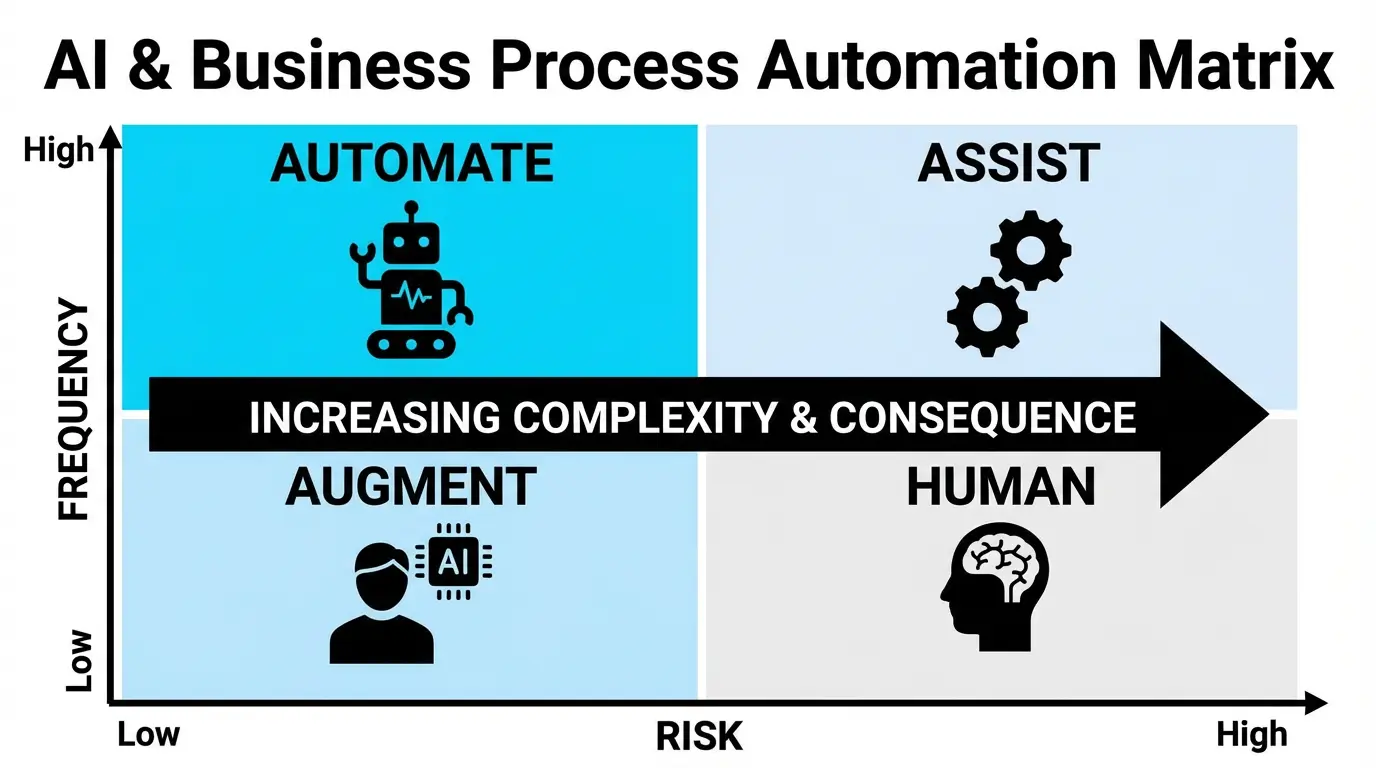
Imagine you just gave an AI agent access to your production code, database, and $1000 API budget. Now you’re refreshing the logs every 30 seconds, afraid of what will happen.
Most developers and businesses desire AI autonomy benefits but are paralyzed by fear of what could go wrong. This fear is typical and totally understandable. LLMs are still in the early phase of development. AI makes a lot of mistakes.
In this guide, I’ll show you how to set up AI systems that can make real decisions while limiting the risk as much as possible, so you can sleep better at night.
AI agent autonomy levels
- Level 0 - AI suggests, human always approves (or not). Human is always in the loop. It’s like using an assistant through ChatGPT interface.
- Level 1 - AI executes pre-approved actions (simple automations)
- Level 2 - AI decides within strict boundaries
- Level 3 - AI makes strategic decisions (rare, high-trust scenarios)
To visualize this, let’s consider the task of answering offer requests from customers:
- level 0 - AI drafts email content
- level 1 - AI gathers customer details, analyzes similar past offers, drafts the email, and notifies the team for approval before sending.
- level 2 - AI can autonomously draft and send offers to small clients with offers under $1000.
- level 3 - AI fully autonomously sends the created offer without human verification.
Nowadays, most businesses should aim for level 2. With proper safety measures, you can trust AI systems enough to allow for such autonomy within strict boundaries.
Level 3 is something we can expect to be reasonable in the next 5-10 years.
7 Safety measures for AI agent autonomy
If an intern deleted the production database, it’s not their fault. It’s the fault of the CTO and IT team that they:
- allowed such action,
- haven’t created backups well enough,
- haven’t onboarded new team member properly.
No matter if you’re working with AI or people - you should guard potential points of failure.
1. Reversibility - “undo” button
As long as it’s possible, AI actions should be easy to reverse.
It’s straightforward for coding agents - use version control systems with remote repositories.
Unfortunately, it’s not that easy with business process AI agents, as every interaction with clients and some interactions with systems are irreversible.
You can’t unsend an email, but not every email has the same consequences. If your AI agent accidentally sends an offer to build a system for $10, you might be legally obliged to honor it—while a poorly worded cold email is just embarrassing.
That’s why it’s important to verify if a potential action done by an agent can be easily reversed. Adding things to a database is easy to reverse, updating can be more dangerous, and deleting is super dangerous. But you can always implement the “undo” button yourself. You can add SQL triggers that will temporarily save deleted (or updated) data, so it won’t be lost for good.
Implementing such “undo” systems can be resource-expensive, but it can save you money and time.
2. Permissions
Remember the intern deleting the production DB? He shouldn’t even be able to perform such an operation in the first place.
Permissions are one of the most important safety measures for systems (not only AI-based) because they block unwanted and potentially dangerous operations.
If your AI agent has no access to the DELETE query, you don’t need to be afraid it’ll delete something. No need to add any fancy levels of backups, etc.
When giving AI access to a database, don’t give it full access with all permissions. Give it only a few tools for adding or updating certain data, so you have full control of what AI can do.
Limiting AI agents’ possibilities (defining fewer tools) has one more great advantage - less context overload. With fewer tool options to choose from, AI has higher chances of picking the right tool for the job.
Permissions for AI agents can be defined at different levels:
- Tool-level permissions - Give AI only specific functions like
add_customer()orupdate_order(), not raw database access - API user permissions - Create a dedicated API user/role with limited scopes (read-only for sensitive tables, write access only for specific endpoints)
- Whitelisting - Define an explicit allowlist of resources the agent can access (e.g., only
/api/customersand/api/orders, blocking/api/admin)
3. System prompt boundaries
System prompts aren’t a security layer, but they’re a useful guardrail. Always describe boundaries explicitly in your system prompt.
Examples of effective boundary prompts:
- “Never execute any transaction above $500 without explicit human confirmation.”
- “You cannot delete any database records. Only CREATE and UPDATE operations are allowed.”
- “All output must be valid JSON. Never return free-form text for tool calls.”
- “If a customer request involves refunds over $100, legal matters, or account termination, escalate to human immediately.”
Never rely on prompts alone - they can be bypassed through jailbreaking or prompt injection. Use prompts as one layer in your defense-in-depth strategy, not as the only safety measure.
4. Keeping budget tight
One thing you can’t undo is spending API credits. A recursive loop calling Opus-4.5 can burn through $500 in minutes. An agent stuck generating images with Nano Banana Pro could cost you thousands before you notice.
Always set the budget you’re willing to RISK with an AI agent. Without usage thresholds, your AI assistant could get stuck in a loop spending your real money while you sleep.
Practical approach:
- Start with a tight budget (e.g., $50/day for testing phase)
- Top up when everything runs smoothly rather than giving unlimited access upfront
- Define maximum spend per day, week, and month
- Set per-task or per-category limits (e.g., max $10 per customer interaction)
- Configure alerts at 50%, 75%, and 90% of your budget threshold
5. Automated verifications and sanity checks
Autonomy doesn’t mean zero validation. The more independent your system, the more automated checks you need.
Two types of verifications:
1. LLM-based verifications - Use another LLM to validate the output. For example: “Does this email sound professional? Return 1 for yes, 0 for no.” Useful for subjective quality checks, but can’t be fully trusted (vulnerable to prompt injection).
2. Coded verifications - Hard-coded rules using if conditions and regex. For example:
- Block emails containing blacklisted words (“free,” “guarantee,” “limited time”)
- Reject any SQL query containing DROP, TRUNCATE, or DELETE
- Verify that generated JSON matches expected schema
- Check that transaction amounts fall within defined ranges
Balance is critical. Too many verifications slow execution, increase costs, and create false positives that block legitimate actions. Start with high-risk actions (transactions, customer communication, data deletion) and add checks only where the cost of an error justifies the verification overhead.
6. Approval thresholds - human in the loop
For critical actions, require human approval. Just like employees need manager sign-off for certain decisions, your AI should pause and wait for confirmation on high-stakes operations.
Examples of approval thresholds:
- Financial: Any transaction above $500 requires approval
- Customer tier: VIP or enterprise clients always need human review before contact
- Data sensitivity: Any operation touching customer payment info pauses for review
- Category-based: Legal issues, refund requests over $100, or account terminations escalate automatically
- Confidence score: If the AI’s confidence is below 85%, flag for human review
Implementation: When a threshold is hit, send a Slack notification with context, log the pending action, and wait for approval before executing. Better to decline a few legitimate actions than to fix catastrophic mistakes.
7. Monitoring
Without monitoring, you’re flying blind. Every AI agent action should produce structured, searchable logs.
What a good log entry looks like:
{
  "timestamp": "2026-01-30T14:23:11Z",
  "session_id": "sess_abc123",
  "action": "send_customer_email",
  "input": {
    "customer_id": "cust_456",
    "email_type": "offer",
    "deal_value": 750
  },
  "decision": "approved",
  "confidence": 0.92,
  "safety_checks": ["budget_ok", "tone_verified", "no_blacklist_words"],
  "output": "email_sent",
  "cost": 0.03,
  "execution_time_ms": 1240
}
What to track:
- Every prompt sent to the LLM and its response (essential for debugging failures)
- Decision rationale (why did the agent choose this action?)
- All safety check results (which checks passed/failed)
- API costs per action
- Execution time
Real-time monitoring is critical. Use real-time logs so you can catch issues before they compound. As your system grows, add anomaly detection to alert you when behavior deviates from normal patterns (e.g., sudden spike in failed actions, unusual spending, repeated errors).
When to let AI decide
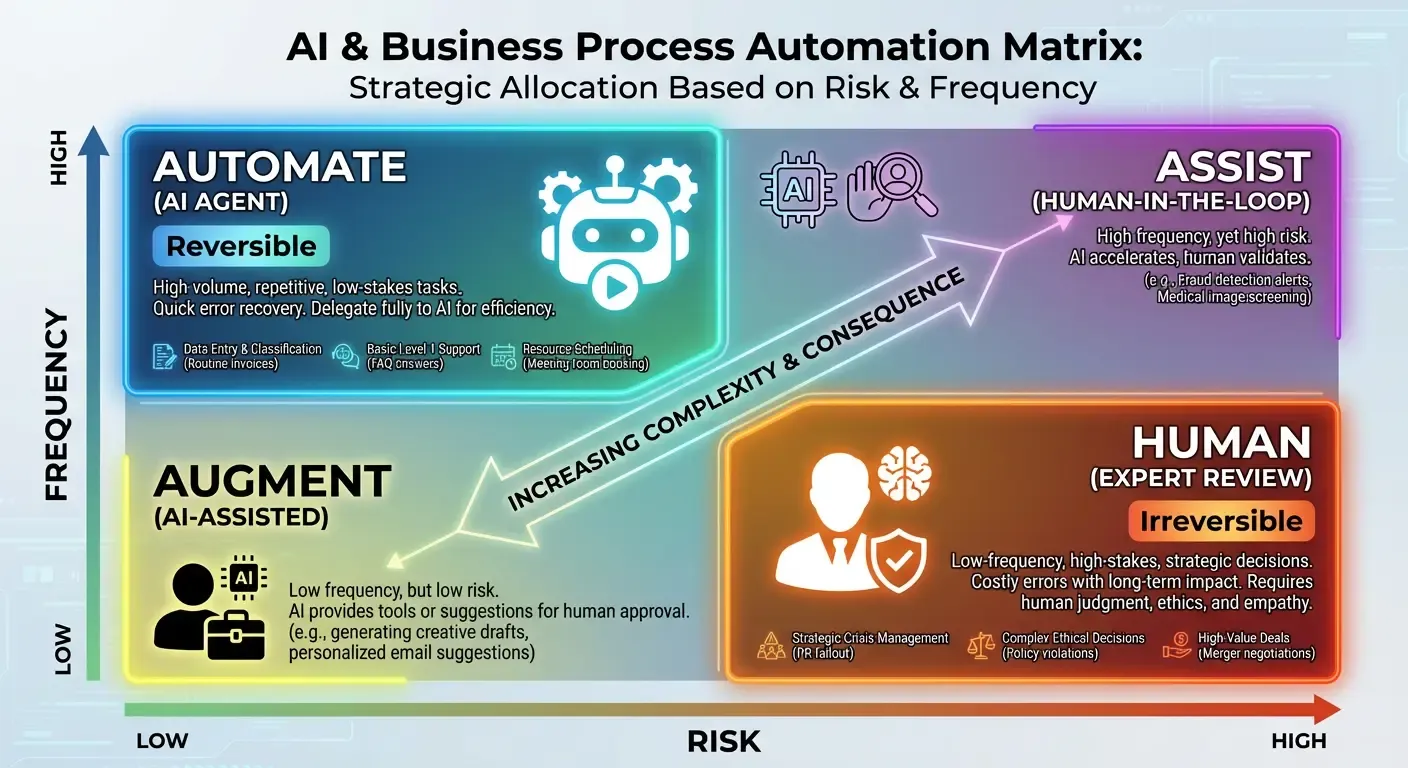
It all depends on how risky the decision is and how frequently it needs to be made.
- High frequency + Low risk + Reversible = AUTOMATE
- Low frequency + High risk + Irreversible = KEEP HUMAN
The 4-Question Test
If you’re not sure if AI should be able to make a decision in a specific scenario, you can always consider the 4-question test:
- Reversibility: Can you easily undo this decision?
- Cost of error: What’s the worst-case damage?
- Frequency: How often does this decision happen?
- Data quality: Do you have good training examples?
Real business examples
Let’s decide on specific business examples of what should be fully automated with AI:
✅ Good for autonomy:
- Customer support categorization
- Meeting scheduling
- Routine data updates
- Alerts
- Sending cold emails
⚠️ Proceed with caution
- Content publishing
- Refunds
- Sending offers
- Procurement/purchase orders
❌ Keep human
- Strategic partnerships
- Legal decisions
- Hiring
- Handling important customer communication
AI autonomy implementation roadmap
Phase 1: Shadow Mode (2-4 weeks)
AI makes decisions but doesn’t execute - you review everything it would have done.
What to do:
- Log all AI decisions without executing them
- Manually compare AI choices against what a human would do
- Track accuracy: how often would the AI have made the right call?
- Identify edge cases and failure patterns
Success criteria: 90%+ accuracy on the target task before moving to Phase 2.
Phase 2: Limited Autonomy (1-2 months)
AI executes low-risk, reversible decisions only, with aggressive monitoring.
What to do:
- Enable AI execution for ONE low-risk task (e.g., support ticket categorization)
- Set tight approval thresholds - when in doubt, escalate to human
- Review logs daily for the first two weeks
- Track error rate, false positives, and time saved
Success criteria: Error rate below 5%, no critical failures, clear time savings.
Phase 3: Gradual Expansion (ongoing)
Slowly increase autonomy based on proven performance, not gut feeling.
What to do:
- Add one new autonomous task every 4-6 weeks
- Expand existing tasks (e.g., increase approval threshold from $100 to $500)
- Stack safety measures based on risk level
- Continue monitoring - never fully “set and forget”
Key principle: “Trust is earned through data, not hope.”
Common Mistakes & How to Avoid Them
Mistake 1: All-or-Nothing Thinking
Wrong: “Either AI does everything or nothing”
Right: Granular control per action type, growing autonomy over time
Mistake 2: Setting & Forgetting
Wrong: Deploy autonomous AI and stop monitoring
Right: Weekly reviews of decision patterns
Mistake 3: Unclear Approval Thresholds
Wrong: “Use your judgment” (AI doesn’t have judgment)
Right: “If X > $100 OR category = ‘legal’, require approval”
Mistake 4: No Human Override
Wrong: AI locks you out of your own system
Right: Always maintain manual control path (admin dashboard with kill switch, direct database access, API endpoints that bypass the agent)
Conclusion: Start Small, Build Trust Through Data
AI autonomy isn’t about blind faith in machines - it’s about systematic risk reduction. You don’t hand over the keys to your entire business overnight. You build trust through data, one decision at a time.
Here’s your action plan:
- Pick ONE repetitive, low-risk decision to automate. Start with something reversible - like categorizing support tickets or scheduling meetings.
- Run shadow mode for 2 weeks. Let the AI make decisions without executing them. Compare its choices to what humans would do.
- Set strict guardrails and go live. Apply permissions, budget limits, and approval thresholds before flipping the switch.
- Monitor obsessively for month 1. Watch the logs, review edge cases, and track error rates closely.
- Expand based on proven performance. Only increase autonomy when the data justifies it - not when your gut feels ready.
Every safety measure in this guide - reversibility, permissions, budget controls, automated checks, approval thresholds, and monitoring - exists to make autonomy practical, not theoretical. Layer them together, and you build a system you can actually trust.
The goal isn’t to eliminate human oversight - it’s to eliminate human bottlenecks on decisions that don’t need you.
Thanks for reading!
Kamil Kwapisz
Working on something similar? Let's talk.
Book a free call →